
Smart Practice Reminders: Building a Daily Routine
How to schedule daily vocal practice in Time to Sing. Set custom reminder times with the wheel picker, select practice days, and protect your singing streak.
The biggest barrier to vocal improvement is rarely a lack of talent or dedication — it is simply forgetting to practice amid a packed schedule.
Vocal folds are living muscles. Singing once a week for two hours causes fatigue and swelling, while ten minutes of gentle daily warming up builds deep muscle memory, expands resonance, and prevents vocal strain.
To make consistency effortless, Time to Sing features Smart Reminders that gently nudge you when it is time for your warmup.
Smart Practice Notifications & Wheel Picker
Set flexible practice reminders with intuitive wheel time pickers to build sustainable vocal stamina and habits.
How to Set Your Practice Schedule
You can customize your reminder schedule directly from your profile:
- Open your Profile (tap your avatar from the top navigation bar).
- Tap Set Reminders (located right beneath the Coach Feedback button).
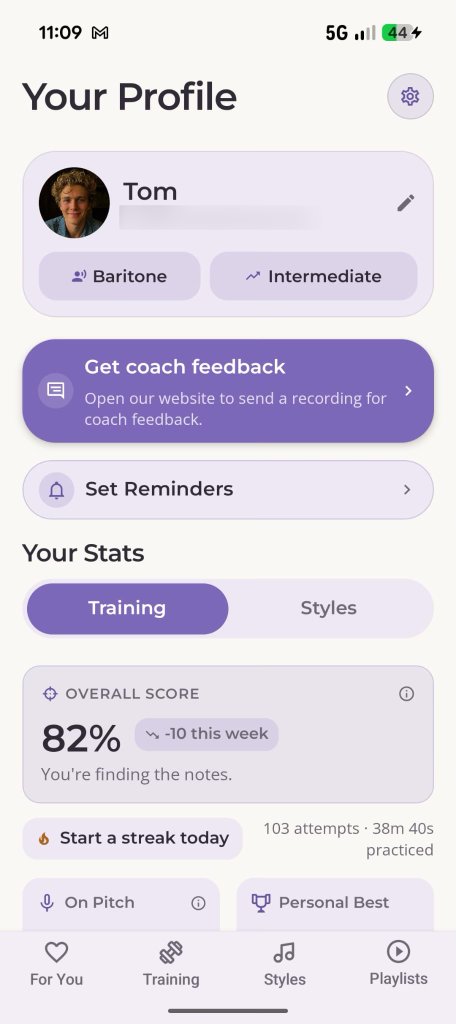
Access Reminders from Your Profile
Tap 'Set Reminders' directly beneath your coach feedback button.
Configuring Your Reminder Settings
Inside the Reminders screen, you have full control over when and how you train:
1. The Wheel Time Picker
Tap the time display to open the smooth drum-wheel time selector. Dial in the exact hour and minute that fits your lifestyle:
- Morning Singers (e.g. 07:45 AM): Warm up gently before leaving for work or rehearsals.
- Afternoon Break (e.g. 01:15 PM): A quick vocal reset between work calls.
- Evening Session (e.g. 07:30 PM): Prepare for choir practice, evening band rehearsals, or unwind with gentle SOVT vocalization.
2. Choosing Your Training Days
Tap the day chips (M, T, W, T, F, S, S) to select which days of the week you plan to sing. You can schedule daily practice, weekdays only, or weekend rehearsal sets.
3. Custom Reminder Message
Personalize the notification text to match your goal — whether it is “Time for your 10-minute warmup!”, “Prep for Friday’s audition!”, or “Keep your 7-day streak alive! 🔥”.
4. Enable / Disable Without Losing Settings
Going on vocal rest or vacation? Simply toggle the reminder switch off. Your saved times, days, and messages are preserved so you can flip them back on with a single tap when you return.
Respectful Notification Delivery
We hate notification spam as much as you do. Time to Sing adheres to strict notification principles:
- Zero Marketing Popups: You will only ever receive alerts at the exact day and time you scheduled.
- Direct to Practice: Tapping a notification opens the app directly into your personalized For You session, ready to sing in one tap without navigating menus.