
1-on-1 Vocal Coach Feedback
Submit audio recordings of your singing to professional vocal coaches Kirill Zolygin and Karina Schwarz. Receive personalized audio commentary and timestamped technique tips.
Visual pitch curves and automated intonation meters are fantastic tools, but they cannot replace the trained ear of a professional vocal coach. An algorithm can tell you if you are hitting a C4, but it cannot tell you if your soft palate is drooping, if your tongue root is tensing, or if you are pushing too much chest weight into your higher register.
With 1-on-1 Coach Feedback, you can send audio recordings of your singing directly to vocal coaches Kirill Zolygin and Karina Schwarz to receive personalized, actionable guidance on your vocal development.
How to Access the Feedback Portal
You do not need to hunt through browser bookmarks or search engines — you can launch the portal directly from your mobile app:
- Open your Profile (tap your avatar in the top bar of the app).
- Tap the prominent purple button: Get coach feedback (“Open our website to send a recording for coach feedback”).
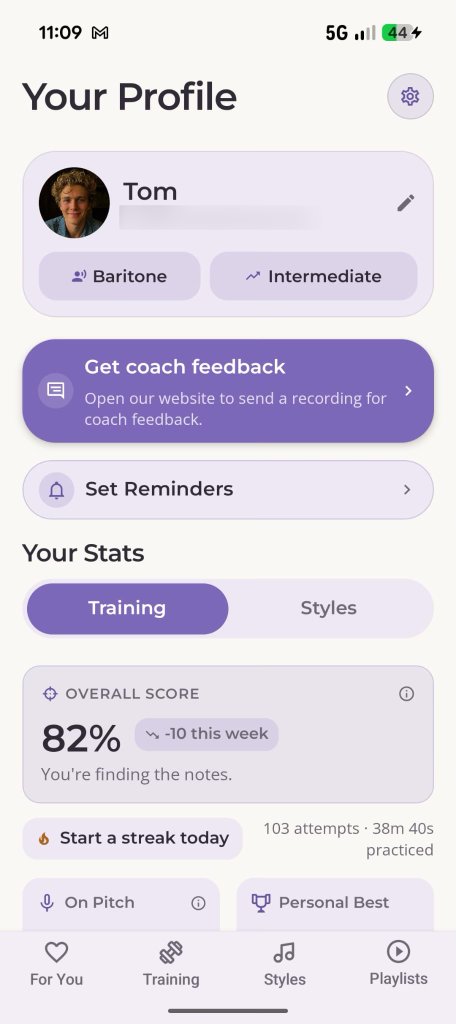
Tap 'Get coach feedback' inside Your Profile
The app securely transfers you directly to the submission portal.
Important Sign-In Details
The app uses a secure handoff token to automatically authenticate you on the web portal. However, keep these two critical details in mind:
1. Purchased Feedback as a Guest? Create an Account First!
If you unlocked coach feedback or upgraded to Pro while browsing as a Guest (without having created an account), you must create a free account inside the app before submitting:
- Open Profile → tap Create Account (or sign in via Apple, Google, or Email).
- This ensures your purchase and your vocal submissions are permanently tied to your profile, allowing your coach's reply to reach you safely.
2. If Automatic Login Doesn't Trigger
On some devices, private browser windows or strict cookie settings may prevent the automatic login handoff from completing.
- If the portal asks you to sign in, simply log in using the exact same account (same Email, Apple ID, or Google Account) that you use in the mobile app. Your feedback credits will appear immediately.
How to Submit Your Recording
Once you are inside the portal:
- Choose What to Record: Select any exercise from the app or an excerpt of a song you are currently working on (up to 3 minutes).
- Record in a Clean Space: Record in a quiet room with your phone microphone roughly 30 to 50 cm away at chest height. Avoid rooms with harsh tile echo (like bathrooms) and do not apply reverb, compression, or pitch correction.
- Add Your Notes: Tell your coaches what you are experiencing. For example: “I feel tension on the high F in measure 12”, “My voice flips when descending from head to chest voice”, or “I run out of air before the end of the phrase”.
- Submit: Upload your audio file. It is encrypted and sent directly to your coach's review dashboard.
What You Receive in Return
Within a few business days, you will receive an email notification that your review is ready. Your personal assessment includes:
- Spoken Audio Commentary: Hear your coach demonstrate the exact acoustic vowel shape, breath support, or tongue adjustment you need.
- Timestamped Written Notes: Precise feedback keyed to specific seconds in your recording.
- Tailored Exercise Recommendations: Direct links to exercises in Time to Sing designed to strengthen the exact technique you need to master.