
Voice Tuner: The Real-Time Piano Roll
Train pitch accuracy with instant visual feedback. How the scrolling piano roll works, how to read your live pitch ribbon, and why visual intonation beats guessing.
Have you ever listened to a recording of your own voice and thought, “Wait, was I really singing slightly flat on that chorus?”
You are not alone. When you sing, you hear yourself primarily through bone conduction — sound vibrations traveling through your jaw, skull, and ear canals. That internal resonance makes pitch feel warmer and fuller than it actually sounds in the room, making it easy to sing 20 or 30 cents flat without realizing it.
The Voice Tuner in Time to Sing acts as an honest, real-time mirror for your vocal folds. Using high-speed acoustic pitch detection through your device microphone, it translates your voice into a responsive visual ribbon gliding across a scrolling piano roll.
Real-Time Piano Roll & Blues Scale Intonation
Target notes stream horizontally across the display while a live colored ribbon tracks your actual sung pitch in real time, turning green when centered.
How to Read the Piano Roll
When you launch a melodic exercise — whether from the Training catalogue or the daily For You routine — you first see the Exercise Intro card with the melody preview and technique tips. Tapping Start brings up the scrolling canvas preceded by a musical count-in:
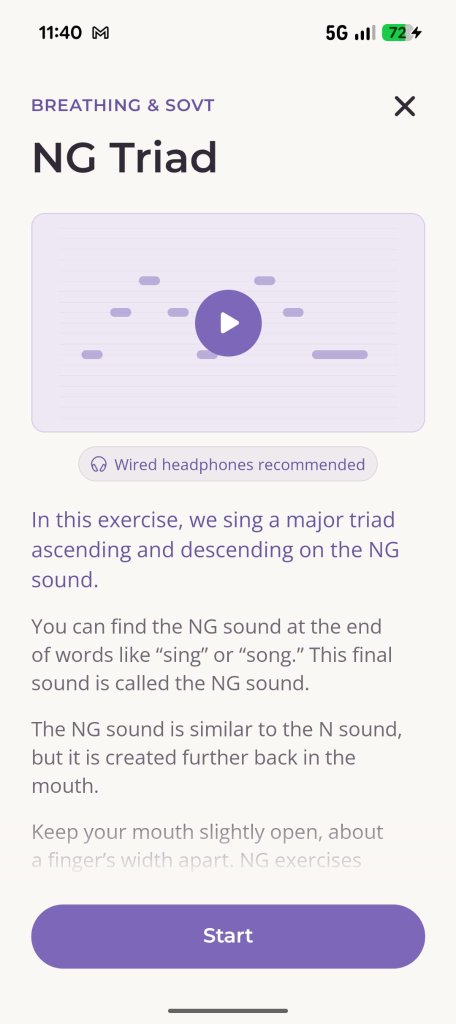
1. Exercise Intro & Preview
Hear the melody and review vocal cues.
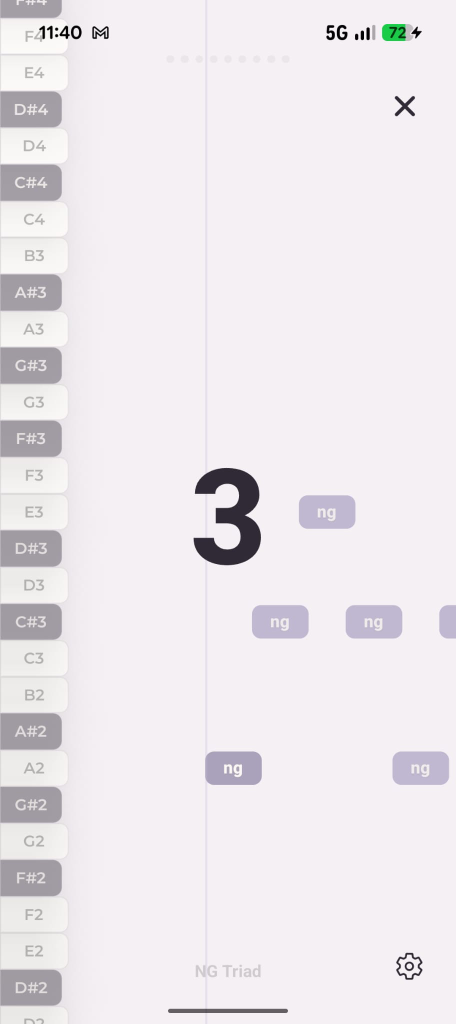
2. Musical Count-In
Inhale deeply before the notes reach the playhead.
From Preview to Musical Count-In
Review mouth shaping and melodic contour before the live count-in begins.
1. The Playhead (Your Target Line)
A vertical guide line marks the exact moment of singing. Notes scroll smoothly from right to left toward this line, giving you ample time to anticipate upcoming intervals.
2. Target Note Blocks
Each note in the exercise appears as a crisp horizontal block. Its vertical position indicates the pitch (e.g. C4, E4, G4), and its width represents how long you need to sustain the sound.
3. Your Live Pitch Ribbon
As soon as you begin singing, a continuous colored trace follows your voice second-by-second:
- Locked In (Center): When your pitch hits the target note within safe vocal tolerance, the block illuminates with a vibrant green glow.
- Flat (Too Low): If your ribbon runs beneath the target block, your pitch is sitting flat. Think about brightening your vowel, lifting your soft palate, or adding slightly more breath support.
- Sharp (Too High): If your ribbon shoots above the block, you are overshooting. Relax throat tension, soften your volume, and avoid pushing excess air against closed vocal cords.
The Two-Phase Practice Flow: Demo & Your Turn
Every exercise is designed to train both your ear and your muscle memory through a structured two-phase routine:
- Demonstration Phase (“Listen”): A top banner appears with a cue to listen. The reference audio plays the phrase cleanly on piano and acoustic guide track. Use this moment to absorb the melody and visualize the jump in your mind.
- Practice Phase (“Your Turn”): The banner flips to green: it is your turn to sing! The microphone opens, the playhead catches your voice, and your ribbon paints your performance directly over the targets.
Post-Exercise Score & Personal Bests
Singing should never feel like a pass-or-fail test, but seeing measurable improvement is incredibly motivating.
At the end of each run, Time to Sing calculates your Intonation Accuracy Percentage — the ratio of time you spent locked directly inside the note targets versus drifting off-pitch. If you set a new high score on that particular exercise, the app saves it as your Personal Best, accessible directly from your Profile statistics.
Ready to Adjust the Tempo?
If a particular riff or scale moves too fast for your vocal agility, do not rush. Open the in-workout settings to slow down playback speed:
- Breath Tracking, Tempo & Workout Controls — How to slow down tricky runs between 0.5× and 1.5×, adjust scroll speed, and train breath support.